If your EVPAD 3S stopped streaming due to outdated apps, your device is not obsolete. You just need the 6868hx APK latest version from 6868hx.net(or 6868jx.net). Follow this quick guide to install JinXing Video RH and HX Store directly on your TV box in minutes.
What is 6868hx and Why Do You Need the Latest APK?
6868hx is the official download portal for upgrading firmware apps on 3rd-generation EVPAD TV boxes, including the EVPAD 3S. If your device displays server errors, buffering loops, or missing channel lists, your legacy applications are no longer maintained.
Upgrading to the 6868hx APK latest version is essential for two reasons:
- JinXing Video RH (Replaces Legacy HengXing): Older setups required two separate apps: HengXing Live for broadcast TV and HengXing VOD for movies. JinXing Video RH combines live channels and video-on-demand into a single, faster interface with updated streaming servers.
- HX Store (JinXing Store): This dedicated third-party app manager lets you safely download and update essential streaming platforms like YT, Nflix, Dney+, and iQIYI directly onto your EVPAD 3S without Google Play Store errors.
Installing these files restores complete streaming functionality to your EVPAD 3S, eliminating the need to replace your hardware.
Step-by-Step: How to Download & Install 6868hx APK on EVPAD 3S
Follow these direct steps to download and install both apps onto your TV box using the built-in browser:
Step 1: Open the TV Box Browser
- Turn on your EVPAD 3S and go to the home screen.
- Click on the Browser icon to launch the web browser.
Step 2: Enter the 6868hx Download Portal
-
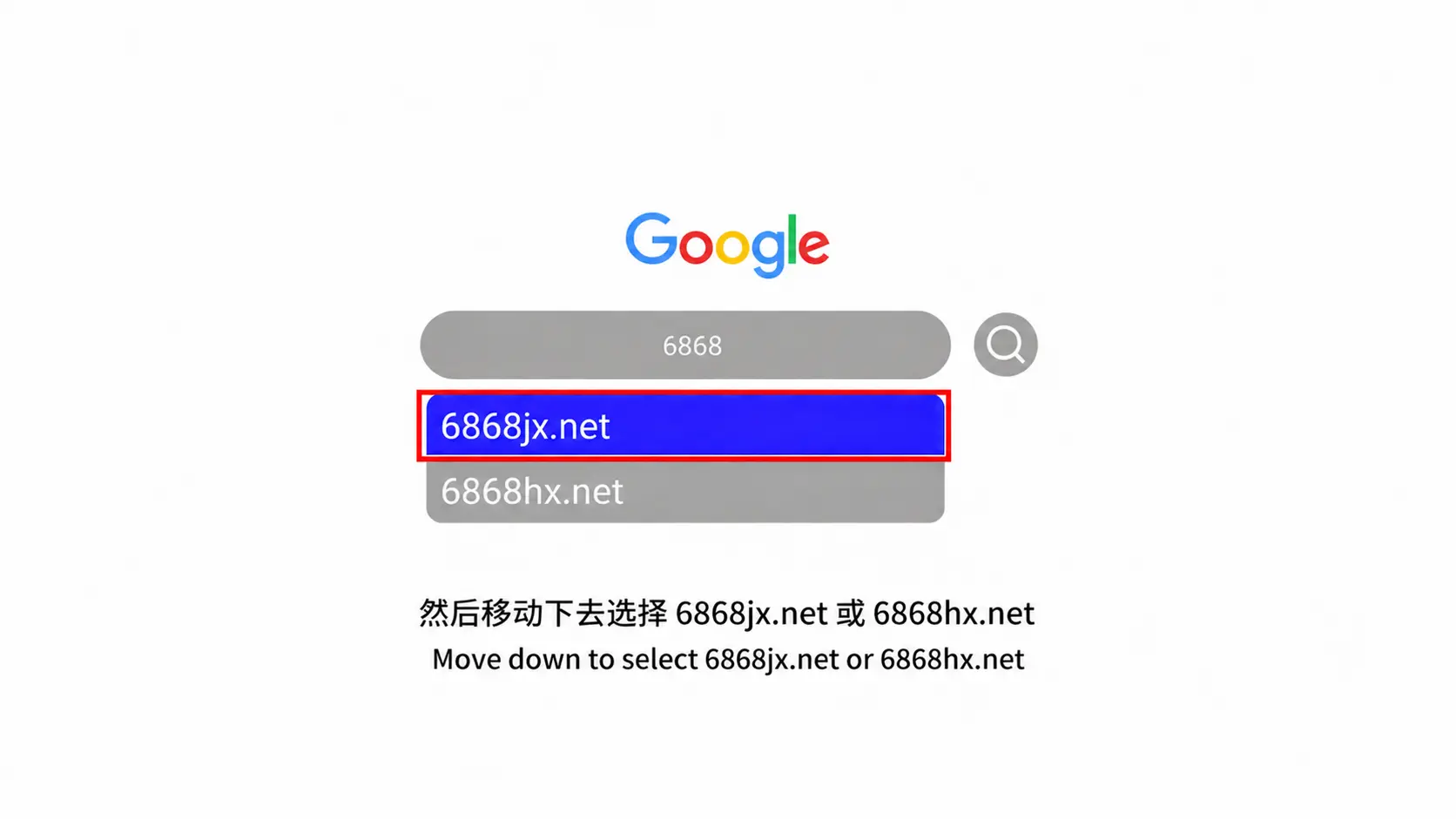
- In the address bar, enter
6868hx.net(or6868jx.net) and press Go. - Note: Do not leave spaces in the URL. The site will display download options for both apps.
- In the address bar, enter
Step 3: Download and Install JinXing Video RH
- Click on the JinXing Video RH card to start downloading the APK.
- When prompted by the system, click Confirm.
- After the file finishes downloading, tap Install.
- If asked for system access, choose Allow to ensure live streams load properly.
Step 4: Download and Install HX Store
- Return to the browser page at
6868hx - Click on HX Store to download the store APK.
- Confirm and run the installation.
- Once complete, open HX Store from your main menu to install secondary apps like YouTube and Netflix.
Troubleshooting Common 6868hx Download & Installation Errors
If you encounter issues while downloading or launching apps on your EVPAD 3S, apply these targeted fixes:
Cannot Access 6868hx on the Browser?
- Switch to the mirror domain: If
6868hx.netfails to open, enter6868jx.netin the address bar. - Clear browser data: Open Settings > Apps > Browser, then tap Clear Cache and restart the browser.
- Verify internet connection: Ensure your TV box is actively connected to the internet. Switching from Wi-Fi to a LAN cable often solves timeout issues.
“Installation Blocked” or “Parse Error”?
- Enable Unknown Sources: Navigate to Settings > Security, and toggle Unknown Sources to Allow.
- Re-download the APK: A parse error means the file downloaded incompletely. Go to File Manager > Download, delete the file, and download it again.
- Free up memory: Check internal storage to confirm there is at least 500MB of free space available.
App Buffering or Closing Automatically?
- Verify app permissions: Head to Settings > Apps > JinXing Video RH > Permissions and ensure storage access is set to Allowed.
- Restart device: Disconnect the EVPAD 3S power adapter for 30 seconds and plug it back in to refresh system cache.
Contact EVPAD Customer Support via WhatsApp: +60 11-2851-1101
Frequently Asked Questions
Where can I download the 6868hx APK latest version?
You can get the newest official APK files directly through your TV box browser at 6868hx.net or 6868jx.net. Avoid unverified third-party sources to ensure security and smooth playback.
Is the 6868hx APK safe to install on older EVPAD models?
Yes. JinXing Video RH and HX Store are the official software updates designed to replace obsolete HengXing apps on 3rd-generation devices (EVPAD 3, 3S, 3Plus).
Can I install these APK files on EVPAD generations other than 3S?
Yes. The portal 6868hxprovides packages supporting EVPAD models from Generation 3 through Generation 6.
Conclusion & Upgrade Options
Setting up your EVPAD 3S with the 6868hx APK latest version restores live TV and VOD channels quickly without spending extra money on new hardware. Following the step-by-step browser download process ensures your device remains fully functional for daily home entertainment.
Keep in mind that the EVPAD 3S runs on older hardware specs. If you want faster response times, AI voice control, and ultra-high-definition 4K/8K streaming, consider upgrading your setup.
Looking for an upgrade? Explore our latest devices here: Browse New EVPAD TV Box Models.
Need Technical Assistance?
- WhatsApp: +60 11-1180 6101
- Email: customer@evpadsg.com